Independent trainer · Online & onsite training

Make data skills work for you.

Practical training in analytics, BI and AI—built around the tools people use and the decisions businesses make.

Based in Hannover, Germany Online worldwide · onsite training available
A practical learning mindset
INSIGHT / 01 LIVE
LEARNING IN ACTIONFrom numbers to insight
BUSINESS VIEW  ↗
Understand01Start with the question
Explore02Work with the data
Communicate03Make the insight useful
Learning curveConcept · Practice · Apply
IMPACTINSIGHTSKILL
ASKANALYSEEXPLAINAPPLY
LEARN BY DOINGBUSINESS ANALYTICS  ·  01 / 04
Clear concepts. Real practice. Useful outcomes.
EXCEL POWER BI TABLEAU SQL AI & GENAI
Experience for the
real world of work.
26+years of total
professional experience
30,000+professionals, faculty
& students trained
250+webinars & workshops
in the last 9 years
350K+YouTube learning
community
MCTMicrosoft
Certified Trainer
SELECTED ORGANISATIONS TRAINING & PROJECT EXPERIENCE

Trusted by teams
across industries.

A selection of organisations shown in my training and consulting profile, across Europe, the United States and Canada.


European clients

17 organisations

US & Canadian clients

44 organisations
01 TRAINING THAT TRAVELS WITH YOU

Choose a skill.
Build capability.

Focused courses for learners and teams, delivered online worldwide or onsite by arrangement—from first steps to advanced, job-ready practice.

01 / 04

Analytics & BI

Power BI · Tableau · Looker Studio

Build the confidence to turn business questions into clear analysis, meaningful dashboards and useful decisions.

  • Data modelling & DAX
  • Dashboard design
  • Business storytelling
Ask about this course
02 / 04

Excel & Google Sheets

Microsoft Excel · Google Sheets

Move from everyday spreadsheet work to advanced formulas, data preparation, reporting and automation.

  • Formulas & lookups
  • PivotTables & charts
  • Power Query & automation
Ask about this course
03 / 04

SQL & data foundations

SQL · Introduction to Big Data

Learn how data is structured, queried and prepared, with a practical introduction to big data concepts.

  • Queries & joins
  • Aggregation
  • Big data concepts
Ask about this course
04 / 04

AI & workplace automation

Introduction to AI · GenAI · Office tools

Make AI concepts approachable and explore responsible, useful ways to bring GenAI and automation into work.

  • AI essentials
  • GenAI foundations
  • Office automation tools
Ask about this course
COURSE MENU PRACTICAL, MODULAR TRAINING

Explore the
course outlines.

Choose a focused session or a deeper programme. Courses are available live online worldwide or onsite by arrangement, and can be adapted to your learners’ goals.

POWER BI10 hours · 5 sessions

Power BI Foundations Workshop

  • Connect to data and prepare it
  • Create clear visuals and reports
  • Use slicers and filters to explore results
Ask about this course
POWER BI20 hours · 10 sessions

Power BI Intensive Workshop

  • Connect, clean and transform data
  • Build data models, hierarchies and interactive visuals
  • Create calculated columns and measures
  • Publish reports and dashboards with Power BI Service
Ask about this course
POWER BI25 hours

Microsoft Power BI Bootcamp

  • Power Query: connect, merge, append and transform
  • Data modelling and DAX calculations
  • Report design, advanced charts, filters and hierarchies
  • Power BI Service, gateways, dashboards and row-level security
Ask about this course
POWER BI · AI15 hours

AI-Assisted DAX for Power BI

  • DAX fundamentals and data models
  • Row context, filter context and CALCULATE
  • Time intelligence, table and relationship functions
  • Use AI to draft, refine, troubleshoot and optimise calculations
Ask about this course
POWER BI · AI3 hours

AI Visuals & Custom Visuals

  • Key Influencers and Decomposition Tree
  • Narrative visual for report summaries
  • Explore and evaluate a range of custom visuals
Ask about this course
POWER BI · AI3 hours

Copilot in Power BI: From Insights to Impact

  • Explore data with natural-language prompts
  • Create and explain report visuals and summaries
  • Use Copilot to assist with DAX
  • Consider responsible and secure use of AI features
Ask about this course
MICROSOFT EXCEL20 hours · 10 sessions

Advanced Excel Workshop

  • PivotTables, slicers and PivotCharts
  • Lookup, logical and COUNTIF functions
  • Data validation and What-If Analysis
  • Macros, hyperlinks and grouping tools
Ask about this course
MICROSOFT EXCEL · BUSINESS ANALYTICS24 hours · 6 sessions

Business Analytics with Excel

  • Analytics foundations, business use cases and Excel for analysis
  • Clean and prepare data with sorting, filters, subtotals and validation
  • Use logical, lookup, reference and statistical functions
  • Analyse data with PivotTables, calculated fields, slicers and charts
  • Build interactive dashboards; use What-If tools and statistical analysis
  • Apply macros and Power Query, then complete an e-commerce or restaurant project
Ask about this course
MICROSOFT EXCEL12 hours

Advanced Excel: Power Query & Power Pivot

  • Connect, clean and transform data with Power Query
  • Build data models and relationships with Power Pivot
  • Create PivotTables, calculated columns and measures
  • Work with sets and KPIs
Ask about this course
TABLEAU10 or 20 hours

Tableau: From Charts to Dashboards

  • Connect to data and create charts
  • Use the Marks card, sorting and grouping
  • Build hierarchies and apply filters
  • Create interactive dashboards and stories
Ask about this course
BUSINESS ANALYTICS25 hours

Business Analytics with Excel

  • Business analytics foundations and decision-making
  • Advanced Excel for analysis and reporting
  • Introduction to SQL through a demonstration
  • Applied HR and financial analytics dashboards
Ask about this course
BUSINESS ANALYTICS30 hours

Business Analytics Certificate Course

  • Advanced Excel: PivotTables, formulas, macros and What-If tools
  • Power BI: connect, clean and model data
  • Build visuals, hierarchies, filters and measures
  • Combine spreadsheet analysis with interactive reporting
Ask about this course
COMBINED WORKSHOP20 hours

Advanced Excel + Power BI

  • Excel: PivotTables, slicers, charts, macros and lookups
  • Excel: What-If analysis
  • Power BI: connect, clean and transform data
  • Power BI: visuals, interactions, filters and measures
Ask about this course
SQL16 hours · 4 days

SQL & MySQL: Foundations to Advanced Topics

  • Database concepts, ER models, relationships and normalization
  • Set up MySQL and Workbench; create and manage databases and tables
  • Query, filter, sort and group data; use operators, constraints and data types
  • Apply aggregate, string, numeric, date and other SQL functions
  • Work with joins, set operators, subqueries and derived tables
  • Use window functions, views, stored procedures and triggers
  • Review query plans, indexes, CTEs and optimisation; complete two analytics projects
Ask about this course

Session lengths are indicative formats based on previously delivered workshops and course outlines. Ask about adapting a programme for your team.

BI PROJECTS FREELANCE CONSULTANCY

Build better BI.
Turn data into decisions.

Alongside training, I support organisations as a freelance BI consultant—contributing to business intelligence projects with practical experience in Power BI, Tableau and SQL.

Discuss a BI project
PROJECT EXPERIENCE
Power BIBusiness intelligence & reporting
TableauAnalytics & visualisation
SQLData querying & analysis
02 HOW WE LEARN

Less jargon.
More “I can do this.”

Good training makes complex tools feel approachable—and gives people time to use them, not just watch.

Shape a session for your team
01

Start with your context

We align examples and depth with your role, goals and current skill level.

02

Learn with real practice

Follow clear demonstrations, then work through guided exercises and questions.

03

Take the skill to work

Leave with a stronger understanding of how the tool helps solve real tasks.

FORMATOnline live sessions Onsite courses Tailored programmes
Portrait of Dr. Sameer Rohadia
TRAINER / ANALYST / EDUCATORDr. Sameer
Rohadia
HANNOVER · GERMANY
03 MEET YOUR TRAINER

Experience that
makes learning click.

I’m Dr. Sameer Rohadia—Business Intelligence Developer, freelance BI consultant and IT trainer, and adjunct professor.

I currently work in a reinsurance company in Hannover, teach at Ganpat University and GSFC University in India, and support freelance BI consultancy projects using Power BI, Tableau and SQL. Earlier, I was Content Manager (Training & Community) at Continental AG, Hannover. I bring 26+ years of total experience across industry, BI projects and teaching, with a focus on making analytics practical and clear.

CURRENT WORKBI Developer · BI Consultant · IT TrainerReinsurance · Freelance BI projects · Adjunct teaching at Ganpat University & GSFC University
PREVIOUS ROLEContent Manager (Training & Community)Continental AG · Hannover
Ph.D. in ERP ImplementationGujarat Technological University, Ahmedabad
Master in Data ScienceBologna Business School · University of Bologna
MBA (IT) · Bachelor of Electrical EngineeringM. S. University of Baroda, India
MCT · Microsoft Power BI, Excel & AzureTableau Desktop Specialist · PSM · PSPO

5 teaching excellence awards· Life Member, AIMA and ISTD

Let’s talk about your learning goals
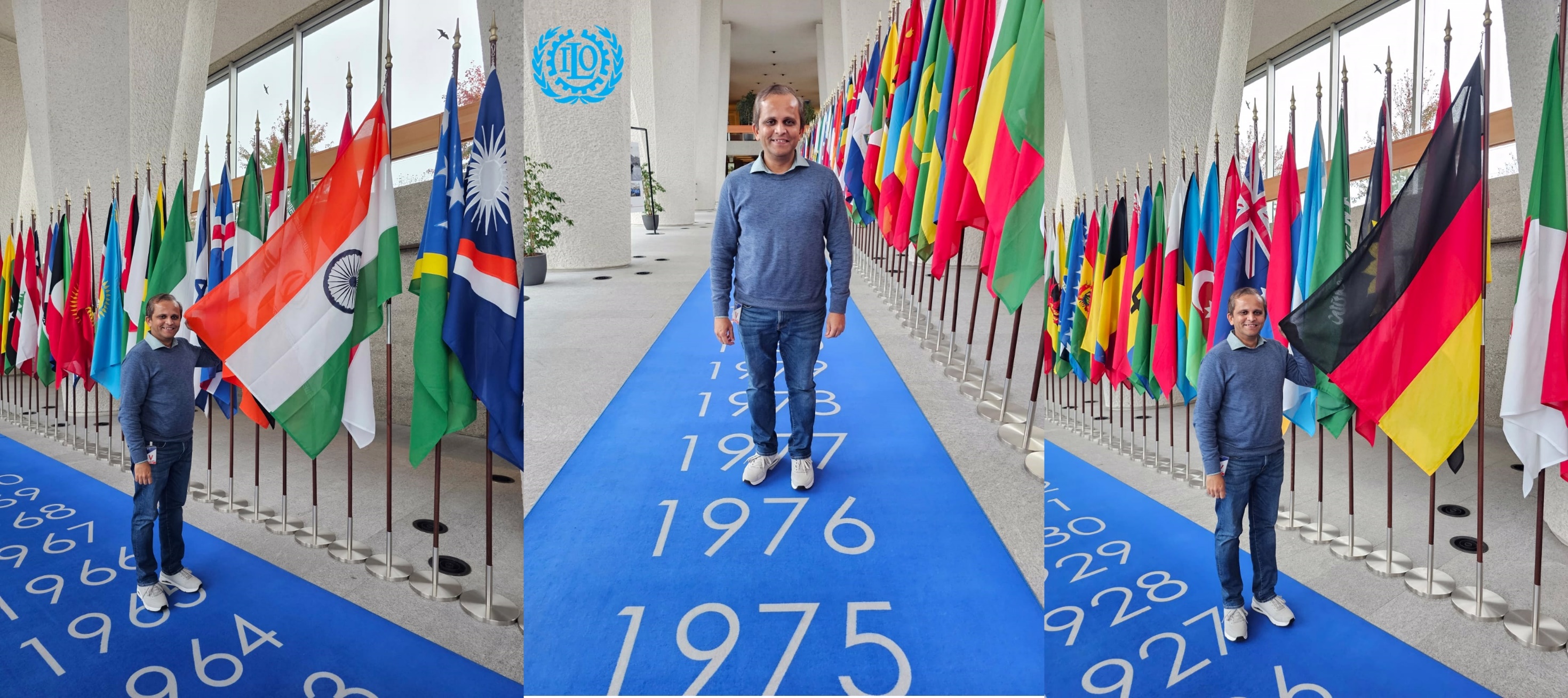
Dr. Sameer Rohadia at the International Labour Organization headquarters in GenevaGENEVA · 2023
FIELD NOTES INTERNATIONAL TRAINING

Learning that
crosses borders.

My work spans university classrooms, professional groups and organisations in Europe, North America and India. I’ve conducted more than 50 sessions for German, Polish and Slovenian students.


SELECTED SESSIONPower BI workshop at the ILO, GenevaOctober 2023
30,000+learners trained250+webinars & workshops5teaching awards
05 BEFORE WE BEGIN

Good questions.
Clear answers.

Can the course be tailored to our team?

Yes. Share the tools, roles, current skill level and outcomes you have in mind. The course outline can be shaped around your context.

Do you support BI consultancy projects?

Yes. I take on freelance BI consultancy projects involving Power BI, Tableau and SQL. Share a brief description of your project and the support you need.

Do you offer both online and onsite training?

Yes. Live online sessions and onsite courses are available. For an onsite request, include your location when you get in touch.

Who are the courses designed for?

Students, working professionals, educators and business teams. We can start with fundamentals or focus on advanced topics.

What language are the sessions conducted in?

Training sessions are conducted in English.

06 START A CONVERSATION

What would you
like to discuss?

Tell me about your training goals or BI project. I’ll get back to you to discuss the right support and next steps.

Examples grounded in business situationsA clear explanation before the hands-on stepsTime for questions and guided practiceContent adapted to your team’s starting point
Online or onsite trainingFor individuals and teams
TRAINING / BI CONSULTANCYLet’s make a plan

Please don’t include passwords, financial details or other sensitive information.

* Required fields